What can I scan with Photomyne?
With the Photomyne app, you can scan:
- Printed photos
- Slides
- Film negatives
- Kids’ artwork
- Documents
- Entire album or scrapbook pages
You can scan multiple photos at once or flip through album pages and scan page after page in just minutes.
After scanning, the app automatically:
- Detects and crops individual photos
- Rotates photos if needed
- Enhances and restores colors
Additional scanning features:
- Voice command scanning (iOS)
- Add scanned photos to a new or existing album
- Import photos from your device into an album
How can I organize and manage my photos?
Photomyne includes powerful photo and album management tools:
- Sort your album list (choose the display order)
- Search for photos by name, location, or year
-
Add details such as:
- Title
- Location
- Names
- Dates
- Audio recordings
- A scan of the back of the photo
- Add or import additional photos to existing albums
- Duplicate photos
- Reorder photos within an album
- Move photos between albums
- Set a cover photo for an album
Editing tools include:
- Apply color filters
- Colorize black & white photos
- Sharpen blurry photos
Does Photomyne back up my photos?
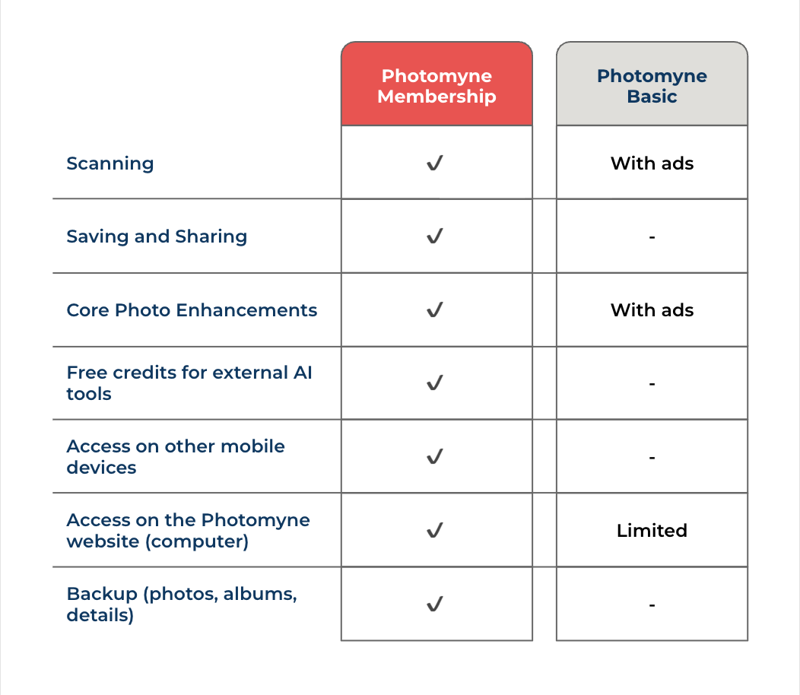
Yes. With an active membership, your photos are backed up to the cloud.
This allows you to:
- Restore your photos if something happens to your device
- Access your account on other supported devices (iPhone, iPad, Android smartphones)
- View and edit your photos online at photomyne.com from your computer
Can I free up space on my device?
Yes. If your device storage is full, you can free up space while keeping your photos safely backed up in the cloud.
This feature is available with an active membership.
How can I share my photos?
You can:
- Share photos via email, Facebook, text message, and other apps on your device
- Share a web link so family and friends can view your photos online — no app download required
Are all features included in every plan?
Some features listed above are premium features and are available to active account members.